NEW HIRE CERTIFIED INSTRUCTOR
REQUIRED TRAINING
As a new hire at Park City, you are required to attend specific modules for general onboarding, company orientation, and on the job specifics to help you be successful at Park City.
Some training is required before you get on snow - this is the READY TO RIDE Training.
In order to hit the slopes you need to be READY TO RIDE. Be sure to complete the full list to ensure you can get on snow!
This is REQUIRED and PAID Training.
Watch this Video to learn how to Punch In and OUT to be PAID for training
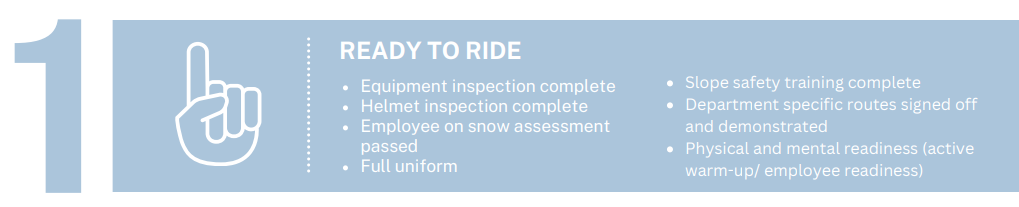
Ready to Ride has 5 REQUIRED STEPS before you can start teaching.
Equipment and Helmet Inspection
Watch the NH Safety Mindset Video - below
Watch the Safety on Snow - Virtual Training on The Lift
Watch the Snow Pro Need to Know - Virtual Training on The Lift
See a Supervisor for the Ready to Ride Sticker
This is REQUIRED and PAID Training.
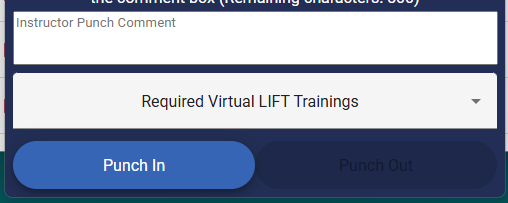
Watch this Video to learn how to Punch In and OUT to be PAID for training
Login using your @vailresorts Single Sign On
For these Training Videos, punch in as “Required Virtual LIFT Trainings”
2. WATCH: SAFETY MINDSET
You have been assigned a number of trainings in TheLIFT - while they are all required, the TWO listed below must be completed before you start teaching
The LIFT uses the @vailresorts SSO username and password.
Additional Online Training - due within one month of your training
You are responsible for the completion of all required training components within the first month of employment or at the prescribed date. If required training is not completed in the season, it may impact your employee evaluations and eligibility for future employment.
Complete all Assigned Modules:
New Employee Orientation (NEO)*
New Employee Safety Orientation*
DEI Fundamentals*
Getting Started with Guest Service*
Expanding your Service Impact*
Active Threat*
Wage and Hour*
Accessing the LIFT on a Computer:
You can access The LIFT on a computer by going to EpicEmployee, clicking the Training & Development tile, then click the Access Learning Oppertunities on the LIFT dropdown. Your assigned training will show in the “Me” tab on the homepage (or in the 'hamburger' menu for mobile users).
Choosing to Access the LIFT on a Mobile Device
See these instructions for how to access training on the LIFT via your mobile browser. To make it easier for you to discover learning opportunities and digital courses, we updated the homepage of the LIFT and improved the experience in the mobile browser. As part of this update, the LIFT mobile application (Saba Cloud app) will no longer be supported. If you have the LIFT app on your phone, please delete it and use your mobile browser to access the LIFT instead.